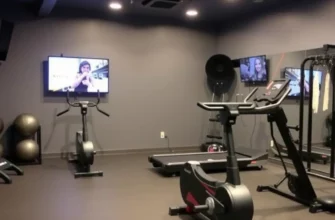
- Building a Connected Ecosystem for Seamless Home Gym Automation
- How to Connect Fitness Equipment to Smart Home Hubs for Data Tracking
- The Ultimate Smart Gym Hardware Compatibility Matrix
- Designing an Automated Workout Environment for Peak Performance
- Step-by-Step Checklist for Your Initial Automation Setup
- Creating Smart Gym Routines that Trigger with Your Heart Rate
- Critical Failures: Why Your Automated Gym Might Be Underperforming
- Future-Proofing Your Smart Fitness Space with Matter and AI
- Frequently Asked Questions
Building a Connected Ecosystem for Seamless Home Gym Automation
The foundation of a high-performance smart gym isn’t just the equipment; it is the “brain” that coordinates every device. To achieve true home gym automation, you must select a central hub capable of processing complex routines without latency. This central controller acts as the conductor, ensuring your heart rate monitor, lighting, and climate systems speak the same language.
In the current landscape, moving toward a unified tech stack is essential for seamless smart home gym integration. This is where protocols like Matter and Thread become game-changers, as they allow devices from different manufacturers to communicate locally and reliably. By prioritizing a hub that supports these universal standards, you ensure your gym remains functional even if your internet connection wavers.
When selecting your ecosystem, consider how various IoT fitness devices will interact with your existing smart home setup. A robust mesh network is often required to handle the data load from high-definition streaming screens and biometric sensors. Without a strong communication protocol, your automation will feel disjointed rather than intuitive.
How to Connect Fitness Equipment to Smart Home Hubs for Data Tracking
The primary challenge for many is learning how to connect fitness equipment to smart home platforms that were originally designed for lights and locks. Modern smart exercise equipment, such as high-end rowers and treadmills, often features proprietary software that acts as a walled garden. However, bridging these gaps is possible through third-party aggregators and cloud-to-cloud syncing.
To begin, look for equipment that offers native integration with Apple Health, Google Fit, or Samsung Health. These platforms act as a data clearinghouse, allowing your smart home dashboard to “see” your active calories or workout status. Once the data flows into these central health apps, you can use automation tools to trigger environmental changes based on your real-time performance.
For equipment lacking direct smart home support, Bluetooth Low Energy (BLE) and ANT+ bridges can often broadcast your metrics to your hub. By utilizing these signals, you can transform a standard workout into a data-driven training session. This connectivity ensures that every mile run or pound lifted is accounted for in your overall wellness ecosystem.
The Ultimate Smart Gym Hardware Compatibility Matrix
| Equipment Brand | Apple HomeKit | Amazon Alexa | Google Home | Primary Sync Method |
|---|---|---|---|---|
| Peloton | Partial (Apple Watch) | Yes | Yes | Peloton App/Cloud Sync |
| Tonal | No (HealthKit Only) | Yes | Limited | Direct API / Bluetooth |
| Concept2 (PM5) | Via Bridge Apps | No | No | ANT+ / ErgData App |
| Wahoo / Zwift | Indirect | Yes | Yes | BLE / Companion Apps |
Designing an Automated Workout Environment for Peak Performance
An automated workout environment goes beyond simple data tracking; it actively responds to your physical needs in real-time. Imagine a scenario where your gym “wakes up” as soon as you step inside, adjusting the HVAC automation to a crisp 65°F. This level of environmental control reduces the mental friction of starting a session and allows you to focus entirely on your physical output.
Lighting scenes play a psychological role in training intensity and recovery. You can program smart lighting, such as Philips Hue, to transition from a soft amber during your warm-up to a high-energy “Daylight” blue during your peak intervals. If your heart rate exceeds a specific threshold, the lights can even flash red to warn you of overexertion or pulse green to signal the start of a rest period.
Ventilation is another critical component of the smart gym experience. By integrating smart plugs or Wi-Fi-enabled fans, you can create a routine where fans trigger automatically once your power output on a bike or rower hits a certain wattage. This prevents overheating before you even realize you need the extra airflow, maintaining your peak performance for longer durations.
Step-by-Step Checklist for Your Initial Automation Setup
- Verify Wi-Fi signal strength in the gym area; install a mesh node if the signal is below -60 dBm.
- Choose a primary ecosystem (Apple, Google, or Alexa) to serve as the automation engine.
- Ensure all smart exercise equipment firmware is updated to the latest version for API stability.
- Install smart switches or plugs for non-smart hardware like high-velocity floor fans.
- Set up your “Workout Mode” scene to trigger with a single voice control gym command.
- Calibrate biometric feedback devices (Apple Watch, Garmin, etc.) with your smart home app.
- Configure smart lighting zones to avoid glare on equipment screens during high-intensity movements.
- Create an “Emergency Stop” routine that turns on all lights and cuts audio in case of equipment failure.
- Sync your music provider (Spotify/Apple Music) to your smart speakers for automatic playlist launching.
- Test the “IF/THEN” logic for your HVAC to ensure the room cools down five minutes before you start.
Creating Smart Gym Routines that Trigger with Your Heart Rate
The most advanced stage of home gym automation involves biometric feedback as a direct trigger for smart home actions. By using services like IFTTT or Home Assistant, you can create routines that respond to your body’s internal state. For example, when your Apple Watch or chest strap detects a heart rate over 140 BPM, your smart home can automatically increase fan speed and dim the overhead lights to reduce sensory distractions.
These smart gym routines also provide a layer of security and focus that manual setups cannot match. You can program your system so that when a “Strength Training” workout is initiated, the front door locks, the doorbell is silenced, and your phone enters “Do Not Disturb” mode. This creates a digital sanctuary where your training cannot be interrupted by external notifications or visitors.
Furthermore, biometric triggers can assist in automated recovery. Once your heart rate drops back to a “resting” zone for two consecutive minutes, the gym can transition into a cool-down state. This might involve activating a smart humidifier, shifting the lighting to a relaxing lavender hue, and playing a guided stretching track through your integrated audio system.
In my experience, the greatest enemy of a consistent workout routine is friction. If you have to open three different apps and issue four voice commands just to get your fans and lights ready, the automation is failing you. I always tell my clients that a smart gym is only successful if it follows the “One-Touch” rule: your entire environment should be ready for your first set with a single button press or a single voice trigger. If it takes more than that, you are just adding digital chores to your physical labor.
Critical Failures: Why Your Automated Gym Might Be Underperforming
Despite the best intentions, smart home gym integration can suffer from significant performance bottlenecks. One of the most common mistakes is bandwidth congestion. High-end equipment like Peloton or Zwift setups require massive amounts of data for 4K streaming and real-time multiplayer interaction; if your smart lights and sensors are clogging the same 2.4GHz band, you will experience lag and dropped connections.
Another major hurdle is the existence of fragmented data silos. If your smart scale doesn’t talk to your fitness tracker, and your fitness tracker doesn’t talk to your smart home hub, you lose the “data-driven training” advantage. This fragmentation leads to a disjointed user experience where you are constantly manually entering data that should be synced automatically.
- Over-complicating the UI: Having too many manual “virtual buttons” instead of automated triggers.
- Ignoring Local Processing: Relying purely on the cloud, which causes delays in lighting and fan responses.
- Poor Sensor Placement: Placing motion or occupancy sensors where they are blocked by large gym machinery.
- Incompatible Ecosystems: Buying hardware that only works with one brand, preventing future expansion.
Future-Proofing Your Smart Fitness Space with Matter and AI
The future of IoT fitness devices is leaning heavily toward interoperability and artificial intelligence. The Matter standard is currently the most significant development in this space, promising a future where your smart exercise equipment can communicate with any hub regardless of the brand. This will eventually eliminate the “ecosystem lock-in” that currently forces users to choose between being an “Apple Gym” or a “Google Gym.”
AI-driven coaching is also set to become a pillar of data-driven training. Future smart gyms will not just record your reps; they will analyze your form via 3D sensors and automatically adjust the resistance or the room’s environment to optimize your output. If the AI detects that your power output is flagging due to heat, it will proactively lower the room temperature before you even feel the fatigue.
As these technologies mature, the focus will shift from simple automation to predictive assistance. Your gym will know your schedule, your fatigue levels, and your goals, preparing the perfect environment before you even walk through the door. Investing in Matter-compatible hardware today is the best way to ensure your gym stays relevant as these AI innovations become the industry standard.
Frequently Asked Questions
Yes, you can easily retrofit an older gym by using smart plugs for fans, adding vibration sensors to machines to track usage, and relying on wearables to act as the primary data trigger for your environment.
Which smart home ecosystem is best for fitness tracking?
Apple HomeKit, powered by HealthKit, currently offers the most robust biometric integration for those with an Apple Watch, while Google Home is often better for those who prefer diverse hardware compatibility and Google Fit’s open API.
How do I prevent my smart gym from lagging during streaming workouts?
I recommend placing your high-bandwidth equipment on a dedicated 5GHz Wi-Fi band or using a Wi-Fi 6 mesh node specifically for the gym to prevent smart sensors from interfering with your workout stream.
Are smart gym routines secure from data breaches?
Security can be improved by using a hub that supports local processing rather than cloud-only commands and by placing all your IoT devices on a dedicated guest network to isolate them from your primary data.
What is the most cost-effective way to start home gym automation?
The best way to start without a huge investment is to focus on environmental triggers, such as smart lighting and smart plugs for your existing fans, which provides the most immediate “high-tech” feel for a low cost.